
AI summary

AI summary

AI summary

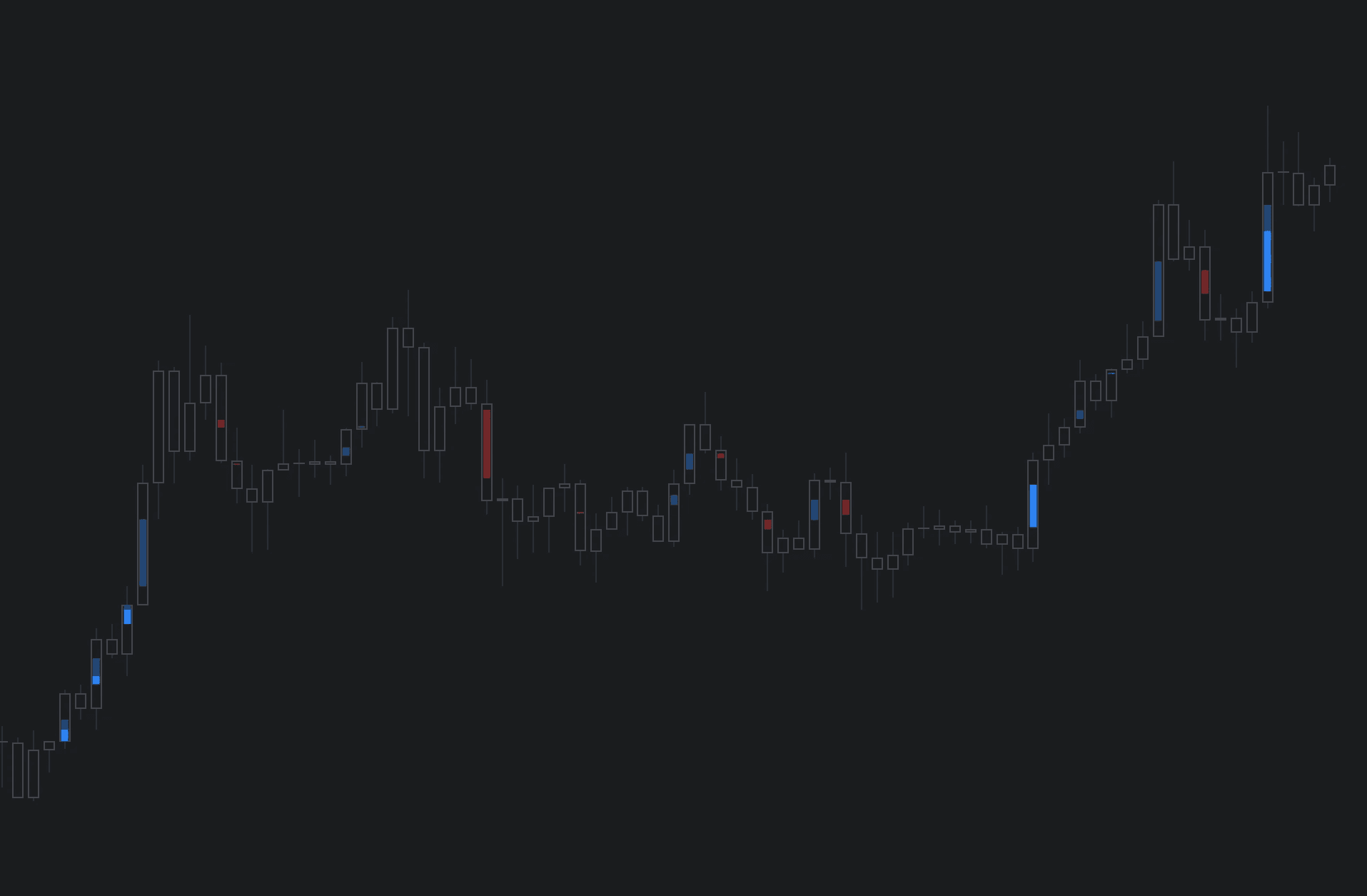
Global & Local RSI is a TradingView indicator contrasting global RSI (long-term trend) with local RSI (recent momentum using stochastic RSI). Includes candles for RSI revealing hidden moves and reversal zones using heatmap style.

Global & Local RSI is a TradingView indicator contrasting global RSI (long-term trend) with local RSI (recent momentum using stochastic RSI). Includes candles for RSI revealing hidden moves and reversal zones using heatmap style.

Global & Local RSI is a TradingView indicator contrasting global RSI (long-term trend) with local RSI (recent momentum using stochastic RSI). Includes candles for RSI revealing hidden moves and reversal zones using heatmap style.

TradingView RSI Indicator: Global & Local RSI

TradingView RSI Indicator: Global & Local RSI

TradingView RSI Indicator: Global & Local RSI

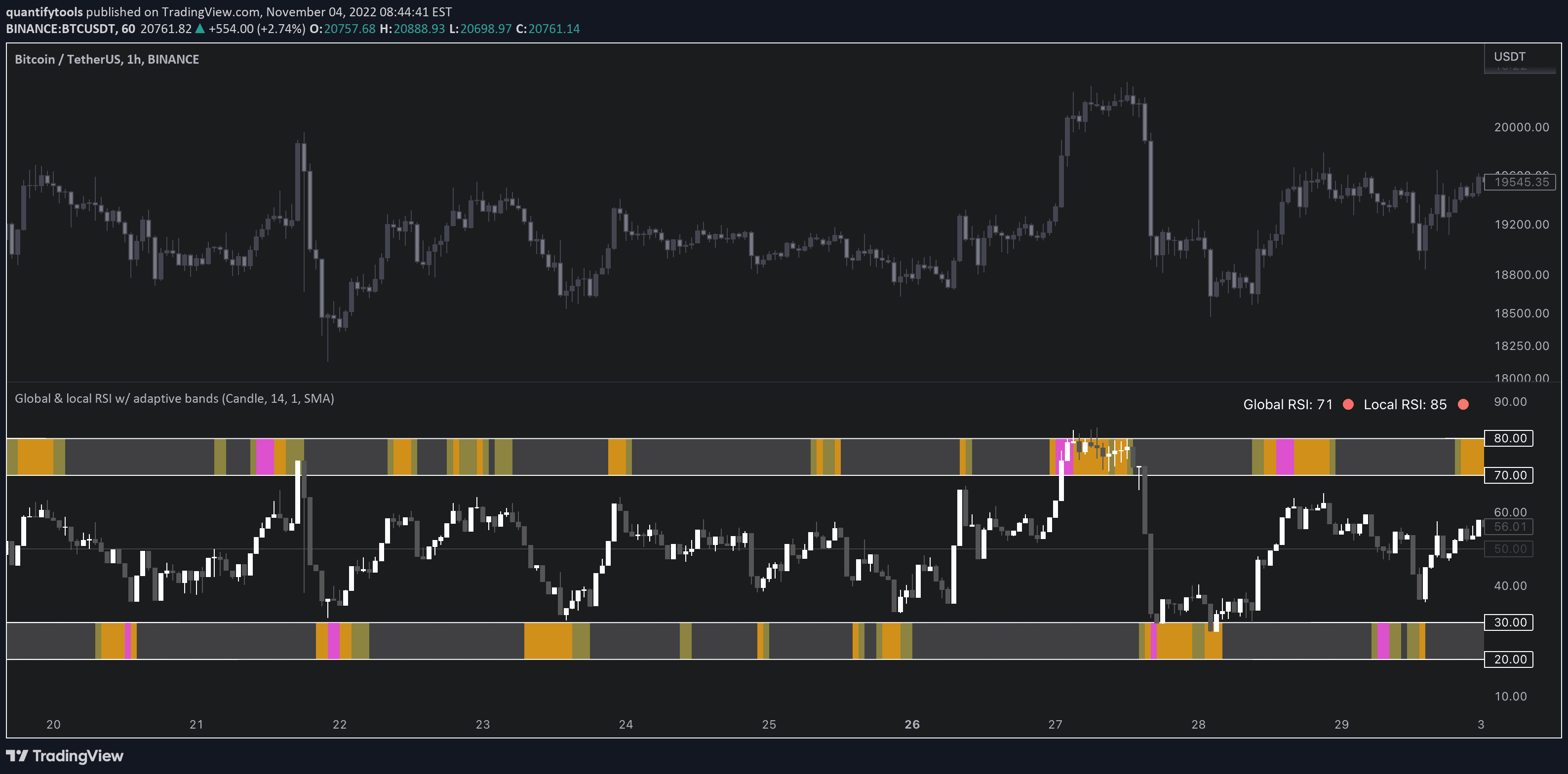
Global & Local RSI displays regular RSI in candles and overlays stochastic RSI on top of in a heatmap format for intuitive insights

Global & Local RSI displays regular RSI in candles and overlays stochastic RSI on top of in a heatmap format for intuitive insights

Global & Local RSI displays regular RSI in candles and overlays stochastic RSI on top of in a heatmap format for intuitive insights

Main image for the guide "TradingView Volume Footprint"

Kenneth

Kenneth

Jan 26, 2026

Jan 26, 2026

2 min read

2 min read

Share

About Global & local RSI

As the terms global and local imply, global RSI describes broad relative strength, whereas local RSI describes local relative strength within the broad moves. A macro and micro view of relative strength so to speak.

Global and local RSI are simply regular RSI and stochastic RSI. Local RSI extremes ( stochastic RSI oversold/overbought) often mark a pivot in RSI which naturally reflects to price. Local RSI extremes are visualized inside the global RSI bands (upper band for overbought, lower band for oversold) in a "heat map" style.

About Global & local RSI

As the terms global and local imply, global RSI describes broad relative strength, whereas local RSI describes local relative strength within the broad moves. A macro and micro view of relative strength so to speak.

Global and local RSI are simply regular RSI and stochastic RSI. Local RSI extremes ( stochastic RSI oversold/overbought) often mark a pivot in RSI which naturally reflects to price. Local RSI extremes are visualized inside the global RSI bands (upper band for overbought, lower band for oversold) in a "heat map" style.

In this article

In this article

In this article

Stochastic RSI heatmap

The heatmap color visible on bands is applied using the following rules, based on stochastic RSI:

Stochastic RSI >= 75 = yellow
Stochastic RSI >= 87 = orange
Stochastic RSI >= 100 = pink

Adaptive bands

Users also have the ability smooth the RSI with their preferred smoothing method ( SMA , EMA , HMA , RMA, WMA ) and length. This leads to different behavior in RSI, rendering the typical RSI extremes (> 70 or < 30) suboptimal or even useless.

By enabling adaptive bands, the extremes are readjusted based on typical RSI pivot points (median pivots ), which gives much more relevant reference points for oversold/overbought conditions in both global and local RSI. This feature can be used without smoothing, but it rarely provides a meaningful difference, unless the RSI calculation length is messed with.

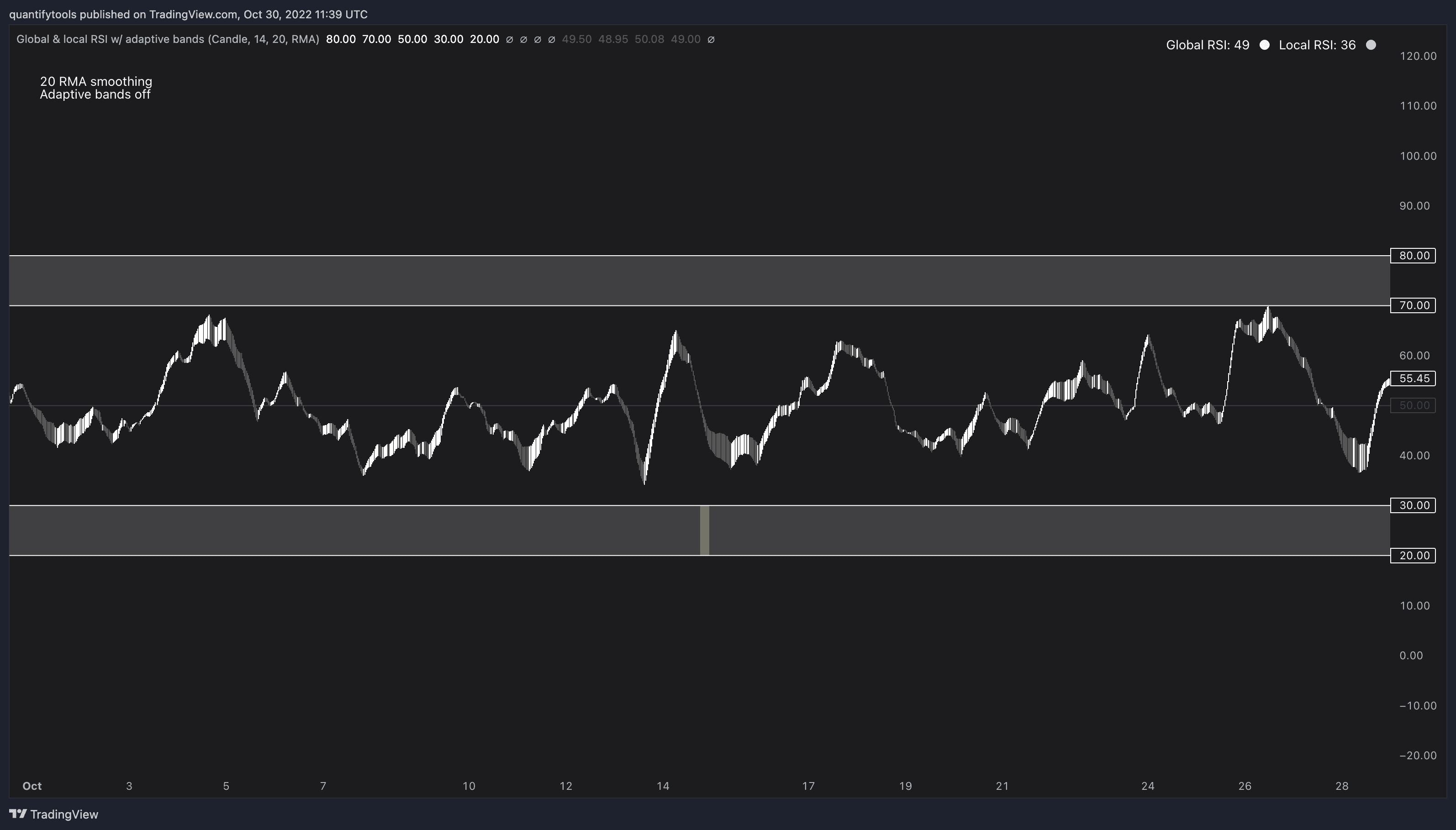
Adaptive bands disabled

When adaptive bands are disabled, extremes in RSI are static, but with smoothing on they might not be relevant.
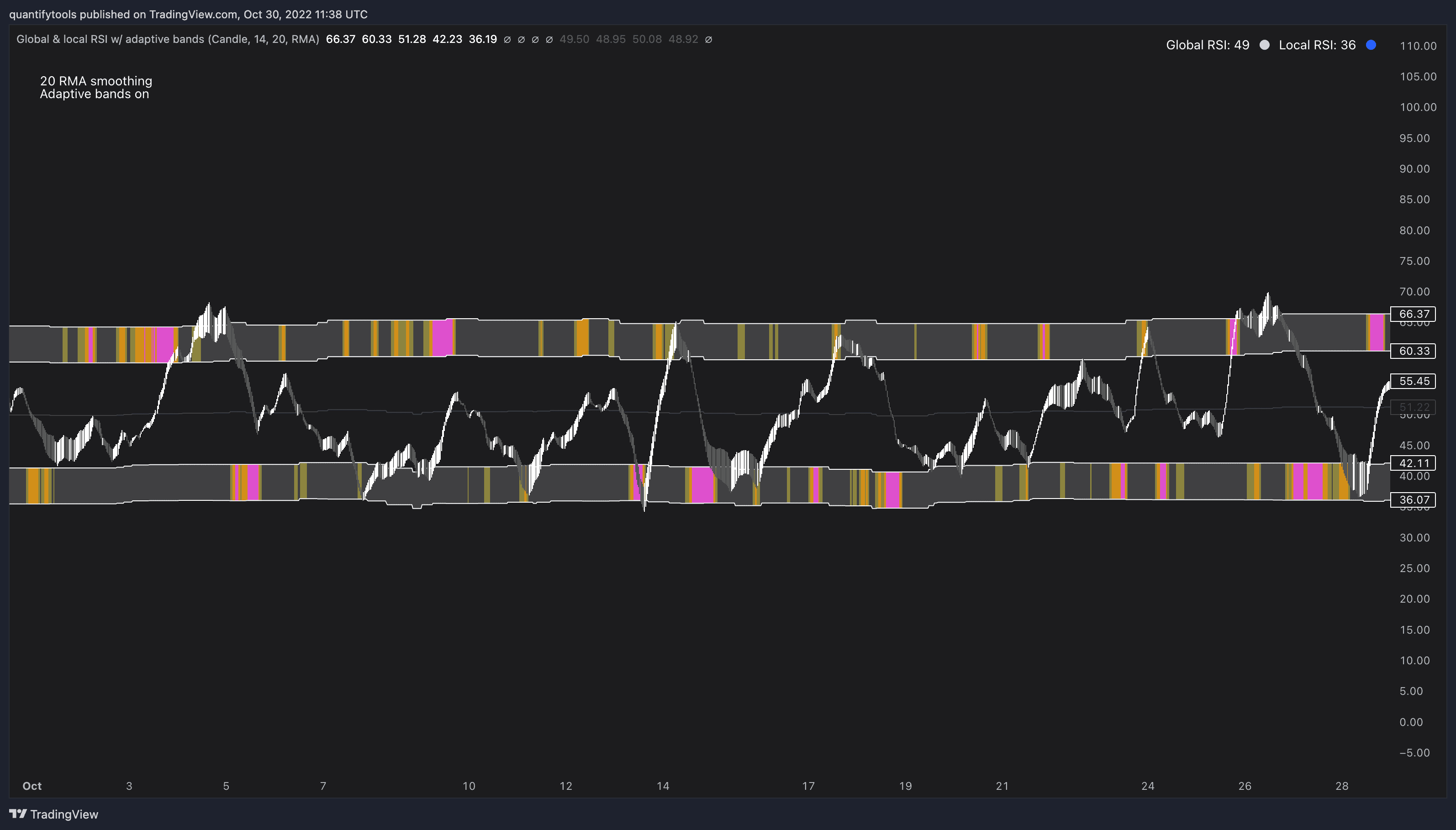
Adaptive bands enabled

Enabling adaptive bands fixed the issue by learning how smoothed RSI has historically moved, identifying the extremes much better.
Stochastic RSI heatmap

The heatmap color visible on bands is applied using the following rules, based on stochastic RSI:

Stochastic RSI >= 75 = yellow
Stochastic RSI >= 87 = orange
Stochastic RSI >= 100 = pink

Adaptive bands

Users also have the ability smooth the RSI with their preferred smoothing method ( SMA , EMA , HMA , RMA, WMA ) and length. This leads to different behavior in RSI, rendering the typical RSI extremes (> 70 or < 30) suboptimal or even useless.

By enabling adaptive bands, the extremes are readjusted based on typical RSI pivot points (median pivots ), which gives much more relevant reference points for oversold/overbought conditions in both global and local RSI. This feature can be used without smoothing, but it rarely provides a meaningful difference, unless the RSI calculation length is messed with.

Adaptive bands disabled

When adaptive bands are disabled, extremes in RSI are static, but with smoothing on they might not be relevant.

Adaptive bands enabled

Enabling adaptive bands fixed the issue by learning how smoothed RSI has historically moved, identifying the extremes much better.

Using Global & local RSI in trading

Global RSI can be plotted as candles, bars or a line. Candles and bars can be useful for detecting rejections (wicks) in relative strength, the same you would with OHLC data. Sometimes there are "hidden rejections" that are visible in relative strength but not on OHLC data, which naturally gives an advantage.
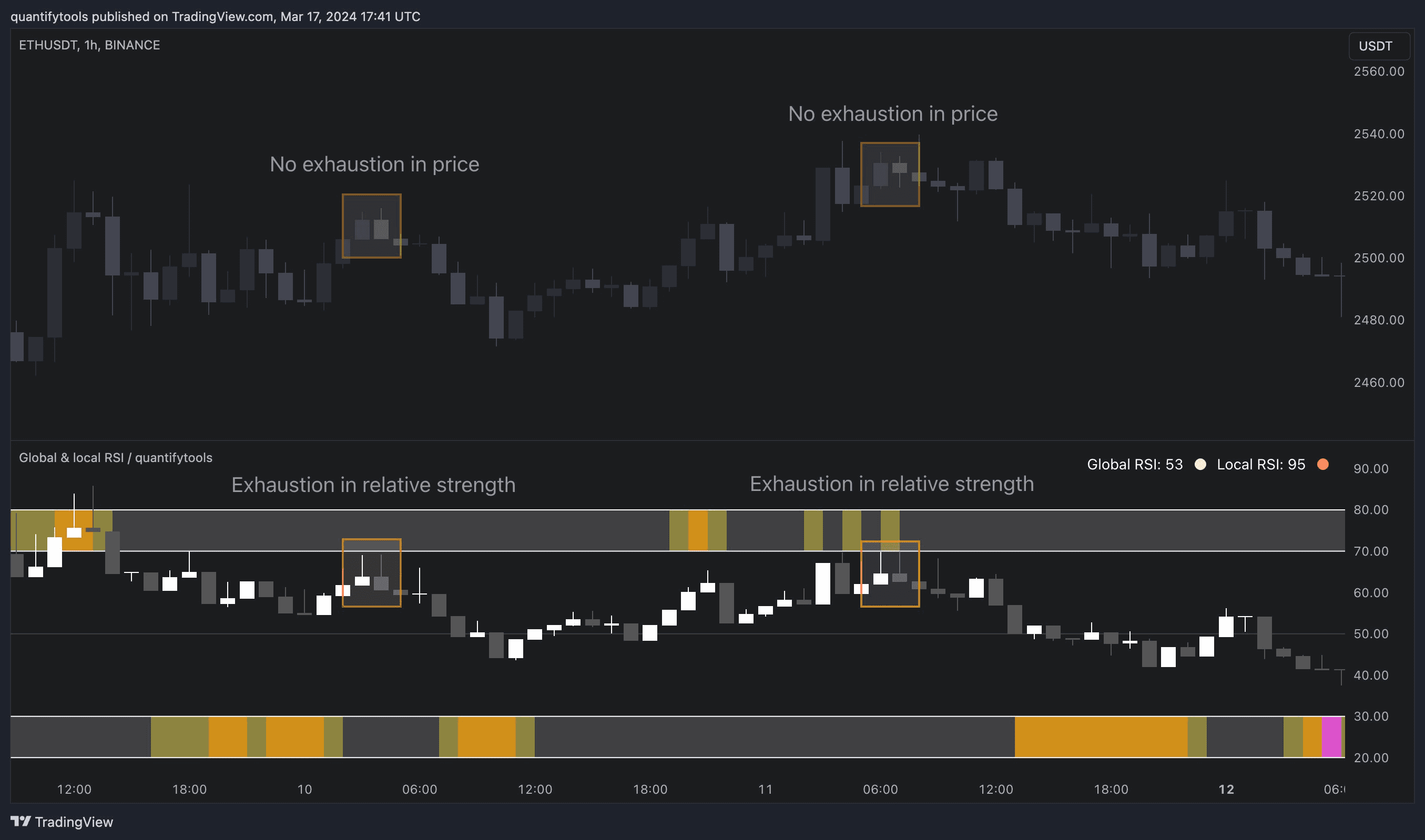
Using Global & local RSI in trading

Global RSI can be plotted as candles, bars or a line. Candles and bars can be useful for detecting rejections (wicks) in relative strength, the same you would with OHLC data. Sometimes there are "hidden rejections" that are visible in relative strength but not on OHLC data, which naturally gives an advantage.

Get Global & local RSI on TradingView

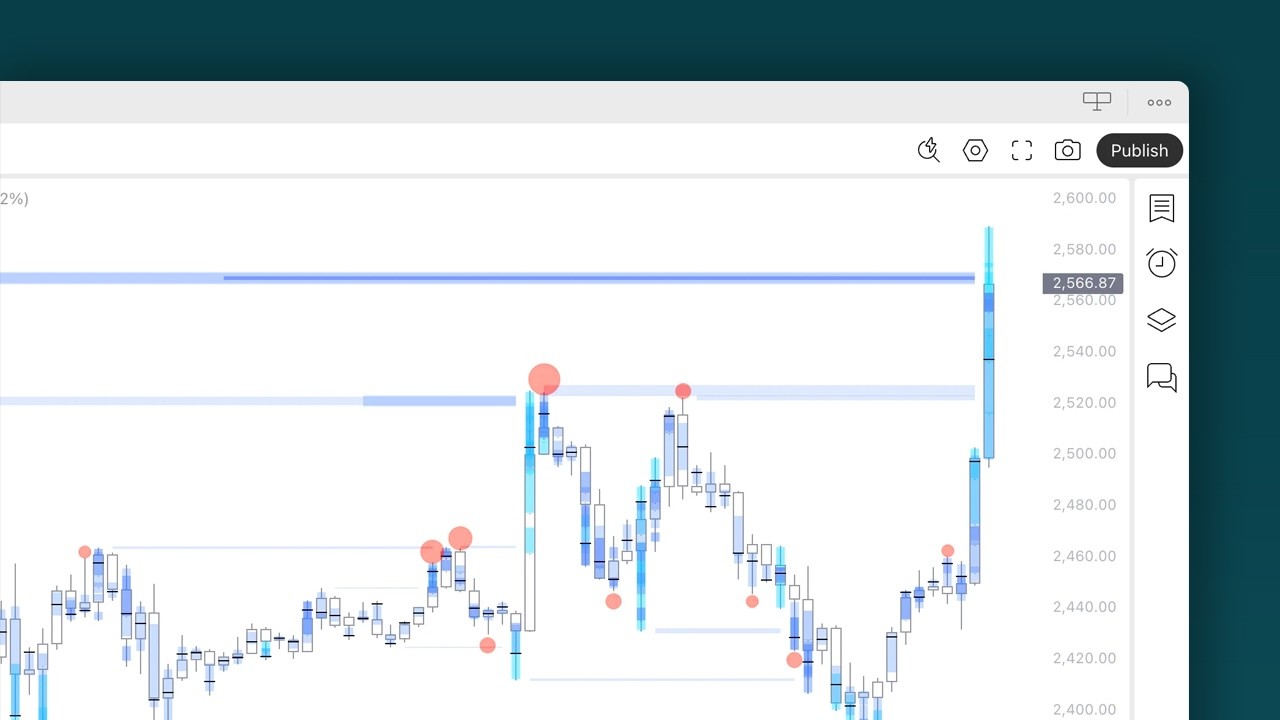
Find TradingView indicators easily by opening up any chart on TradingView (e.g. TSLA) and clicking Indicators tab on top menu. To find all our tools, search "quantifytools" and click an indicator to add to your chart.

TradingView page
Global & local RSI on TradingView ↗

Get Global & local RSI on TradingView

Find TradingView indicators easily by opening up any chart on TradingView (e.g. TSLA) and clicking Indicators tab on top menu. To find all our tools, search "quantifytools" and click an indicator to add to your chart.

TradingView page
Global & local RSI on TradingView ↗

🤖

🤖

🤖

Indicators

Indicators

Indicators

TradingView Indicators

TradingView Indicators

TradingView Indicators

Flowly Indicators

See through charts with orderflow

hello@flowly.tools

Disclaimer

We are an independent script vendor on TradingView and have no affiliation with them. All content provided by us are strictly for educational purposes and should not be construed as financial advice.


Hypothetical or simulated performance shown does not represent actual trading and past results do not guarantee future performance. By using our content for decision making, you do it at your own risk and fully acknowledge that you alone are responsible for your own research and financial decisions.


© 2022-2026 Flowly Indicators. All rights reserved.

Flowly Indicators

See through charts with orderflow

hello@flowly.tools

Disclaimer

We are an independent script vendor on TradingView and have no affiliation with them. All content provided by us are strictly for educational purposes and should not be construed as financial advice.


Hypothetical or simulated performance shown does not represent actual trading and past results do not guarantee future performance. By using our content for decision making, you do it at your own risk and fully acknowledge that you alone are responsible for your own research and financial decisions.


© 2022-2026 Flowly Indicators. All rights reserved.

hello@flowly.tools

Disclaimer

We are an independent script vendor on TradingView and have no affiliation with them. All content provided by us are strictly for educational purposes and should not be construed as financial advice.


Hypothetical or simulated performance shown does not represent actual trading and past results do not guarantee future performance. By using our content for decision making, you do it at your own risk and fully acknowledge that you alone are responsible for your own research and financial decisions.


© 2022-2026 Flowly Indicators. All rights reserved.

quantify.tools is now Flowly Indicators. Read announcement